
To begin working with large public datasets, I first downloaded the NYC Taxi Yellow Trip Parquet files for 2024. To load them into SQL Server 2019, I needed to convert them from Parquet to PSV (pipe-separated values). SQL Server 2019 cannot natively read Parquet, so a conversion step is required. This limitation was removed in SQL Server 2022, where PolyBase or OPENROWSET (BULK …, FORMAT=’PARQUET’) can be used to read and write Parquet files directly.
Furthermore, when working in Databricks Community Edition, the workspace storage cap (100 files, 5 GB each) makes file management strategy important. Even though Parquet is already a highly compressed, columnar format, the NYC Taxi Yellow Trip data monthly Parquet files are tiny by comparison—around 49 KB per month for 2024 versus 293 KB for the same data as PSV (pipe-separated values). That difference illustrates Parquet’s efficiency in both compression and column encoding.
Each monthly Parquet file is small; it’s entirely reasonable-and sometimes desirable—to merge them into a single Parquet file per year, or even one consolidated file spanning multiple years (e.g., 2000–2024). Doing so reduces the number of files Databricks must manage and can improve query performance by minimizing metadata overhead. Plus, I can experiement with larger datasets. The trade-off is that extremely large single files can limit parallelism, so there’s a balance: one file per year sounds ideal.
What Is a Parquet File?
A Brief History of Parquet File Adoption
Parquet: Origins and Adoption Timeline
2013 — Birth of Parquet
- Created by engineers at Twitter and Cloudera as an open columnar storage format for the Hadoop ecosystem.
- Designed to be language-agnostic, self-describing, and optimized for analytical scans over large datasets.
- Based on ideas from Google’s Dremel paper (which inspired BigQuery’s columnar model).
- Released under the Apache License and became part of the Apache Parquet project.
2014–2016 — Early Hadoop & Spark integration
- Quickly adopted in the Hadoop ecosystem:
- Hive gained native Parquet read/write support.
- Impala, Pig, Presto, and Drill added connectors.
- Apache Spark made Parquet its default storage format for DataFrames by 2015.
- Around this time, Amazon EMR, AWS Athena, and Google BigQuery began supporting Parquet as a queryable format.
2017–2019 — Cloud standardization
- Azure Data Lake Storage (ADLS) and Azure Synapse (then SQL DW) added direct Parquet support.
- Power BI introduced direct connectors to Parquet in ADLS and Blob Storage.
- Python & R ecosystems adopted PyArrow and pandas.DataFrame.to_parquet(), making Parquet accessible to analysts without Hadoop.
- Parquet effectively became the default interchange format for modern data lakes.
2019–2021 — Delta & Lakehouse evolution
- Databricks introduced Delta Lake, extending Parquet with an ACID transaction log, time travel, and schema evolution — effectively “Parquet++.”
- Snowflake, BigQuery, and Redshift Spectrum all supported querying Parquet directly in object storage.
- Parquet became synonymous with “open lakehouse storage.”
2022–Present — Parquet is everywhere.
- DuckDB, Polars, Dask, and Pandas (PyArrow backend) all use Parquet as their preferred columnar format.
- SQL Server 2022 and PolyBase added official Parquet virtualization support.
- Synapse serverless, Fabric, and Databricks SQL treat Parquet (and Delta, which builds on it) as native citizens.
- The format is now a core part of open table formats (Delta, Iceberg, Hudi).
Parquet started as a Hadoop optimization but evolved into the universal language of data lakes — the one format everyone reads, writes, and trusts across on-prem, Azure, AWS, and open-source engines.
Why Parquet File Format?
Parquet is a columnar, compressed, and self-describing file format designed for efficient analytics at scale. Storing data by column rather than row dramatically reduces storage size and speeds up queries that only touch selected fields. In practice, this means faster reads, smaller footprints, and seamless compatibility across platforms like Azure, Databricks, SQL Server, Power BI, and DuckDB—all while preserving full schema fidelity.
Convert & Validate Parquet Files:
Step 1 — Convert Parquet to PSV (and back) using Python
# parquet_to_psv.py
import argparse
from pathlib import Path
import duckdb
import pandas as pd

def to_posix(p: Path) -> str:
    return str(p).replace("\\", "/")

def convert_one(con,
                src: Path,
                out_root: Path,
                base_root: Path,
                flat: bool,
                overwrite: bool,
                limit: int | None):
    """
    Returns: (file, source_rows, written_rows, limit, status, out_path)
    """
    src = src.resolve()
    if not src.exists():
        return (str(src), None, None, limit, "NOT_FOUND", None)

    # Build output path: mirror from base_root unless --flat
    rel = Path(src.name) if flat else src.relative_to(base_root)
    out_path = (out_root / rel).with_suffix(".psv")
    out_path.parent.mkdir(parents=True, exist_ok=True)

    SRC = to_posix(src)

    # Compute source rowcount up front (cheap in DuckDB)
    source_rows = int(con.sql(f"SELECT COUNT(*) FROM read_parquet('{SRC}')").fetchone()[0])

    if out_path.exists() and not overwrite:
        # We didn't write the file, but for summary we still show written_rows as the file's current rows
        # Try to read the PSV quickly to report its size; if it fails, leave as None.
        written_rows = None
        try:
            written_rows = int(con.sql(
                f"SELECT COUNT(*) FROM read_csv('{to_posix(out_path)}', delim='|', header=True, quote='\"', escape='\"')"
            ).fetchone()[0])
        except Exception:
            pass
        return (str(src), source_rows, written_rows, limit, "SKIPPED_EXISTS", str(out_path))

    # Prepare SELECT with optional LIMIT for writing
    base_sql = f"SELECT * FROM read_parquet('{SRC}')"
    limited = False
    if limit is not None:
        base_sql += f" LIMIT {limit}"
        limited = True

    # Write PSV
    copy_sql = f"""
        COPY ({base_sql})
        TO '{to_posix(out_path)}'
        WITH (
            HEADER,
            DELIMITER '|',
            QUOTE '"',
            ESCAPE '"',
            NULL '',
            DATEFORMAT '%Y-%m-%d',
            TIMESTAMPFORMAT '%Y-%m-%d %H:%M:%S'
        );
    """
    con.sql(copy_sql)

    # Determine rows actually written
    if limit is None:
        written_rows = source_rows
    else:
        written_rows = min(source_rows, limit)

    # Status logic
    if limited and written_rows < source_rows:
        status = "LIMITED"
    else:
        status = "OK"

    return (str(src), source_rows, written_rows, limit, status, str(out_path))

def main():
    ap = argparse.ArgumentParser(
        description="Convert Parquet files to PSV (pipe-separated) using DuckDB."
    )
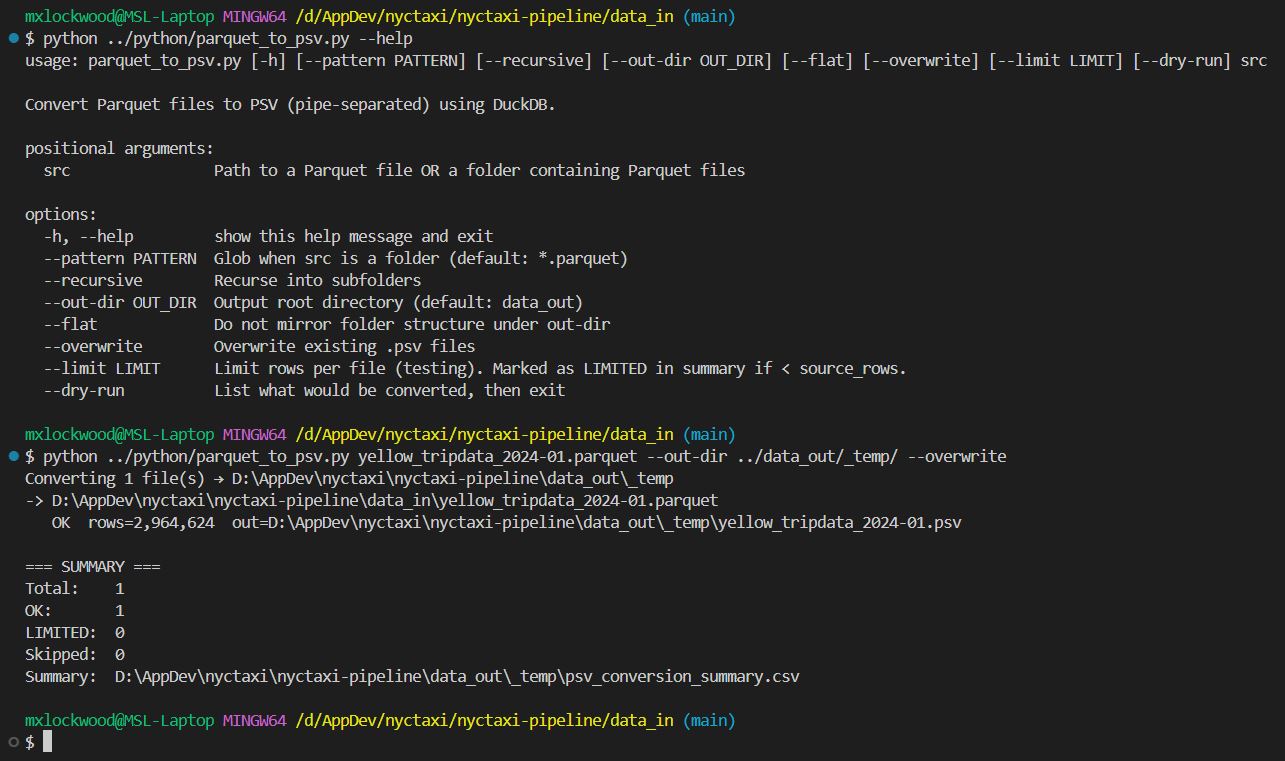
    ap.add_argument("src", help="Path to a Parquet file OR a folder containing Parquet files")
    ap.add_argument("--pattern", default="*.parquet", help="Glob when src is a folder (default: *.parquet)")
    ap.add_argument("--recursive", action="store_true", help="Recurse into subfolders")
    ap.add_argument("--out-dir", default="data_out", help="Output root directory (default: data_out)")
    ap.add_argument("--flat", action="store_true", help="Do not mirror folder structure under out-dir")
    ap.add_argument("--overwrite", action="store_true", help="Overwrite existing .psv files")
    ap.add_argument("--limit", type=int, default=None, help="Limit rows per file (testing). Marked as LIMITED in summary if < source_rows.")
    ap.add_argument("--dry-run", action="store_true", help="List what would be converted, then exit")
    args = ap.parse_args()

    src_path = Path(args.src).resolve()
    if not src_path.exists():
        raise FileNotFoundError(f"Not found: {src_path}")

    out_root = Path(args.out_dir).resolve()
    out_root.mkdir(parents=True, exist_ok=True)

    # Build file list + base_root for mirroring
    if src_path.is_file():
        files = [src_path]
        base_root = src_path.parent
    else:
        files = sorted(src_path.rglob(args.pattern) if args.recursive else src_path.glob(args.pattern))
        base_root = src_path

    if not files:
        print("No files matched.")
        return

    print(f"Converting {len(files)} file(s) → {out_root}")

    if args.dry_run:
        for f in files:
            rel = Path(f.name) if args.flat else f.relative_to(base_root)
            out_path = (out_root / rel).with_suffix(".psv")
            print(f"DRY-RUN  {f}  ->  {out_path}")
        return

    results = []
    with duckdb.connect() as con:
        for f in files:
            print(f"-> {f}")
            file_str, source_rows, written_rows, limit, status, outp = convert_one(
                con=con,
                src=f,
                out_root=out_root,
                base_root=base_root,
                flat=args.flat,
                overwrite=args.overwrite,
                limit=args.limit
            )
            results.append((file_str, source_rows, written_rows, limit, status, outp))
            if status == "LIMITED":
                print(f"   ⚠️  LIMITED: wrote {written_rows:,} of {source_rows:,} rows (limit={limit})  out={outp}")
            else:
                print(f"   {status}  rows={written_rows:,}  out={outp}")

    # Rollup CSV in out_dir
    df = pd.DataFrame(results, columns=["file", "source_rows", "written_rows", "limit", "status", "out"])
    rollup = out_root / "psv_conversion_summary.csv"
    df.to_csv(rollup, index=False, encoding="utf-8")

    print("\n=== SUMMARY ===")
    print(f"Total:    {len(df)}")
    print(f"OK:       {(df['status'] == 'OK').sum()}")
    print(f"LIMITED:  {(df['status'] == 'LIMITED').sum()}")
    print(f"Skipped:  {(df['status'] == 'SKIPPED_EXISTS').sum()}")
    print(f"Summary:  {rollup}")

if __name__ == "__main__":
    main()
Use –help to see usage information ⬆ Back to Top
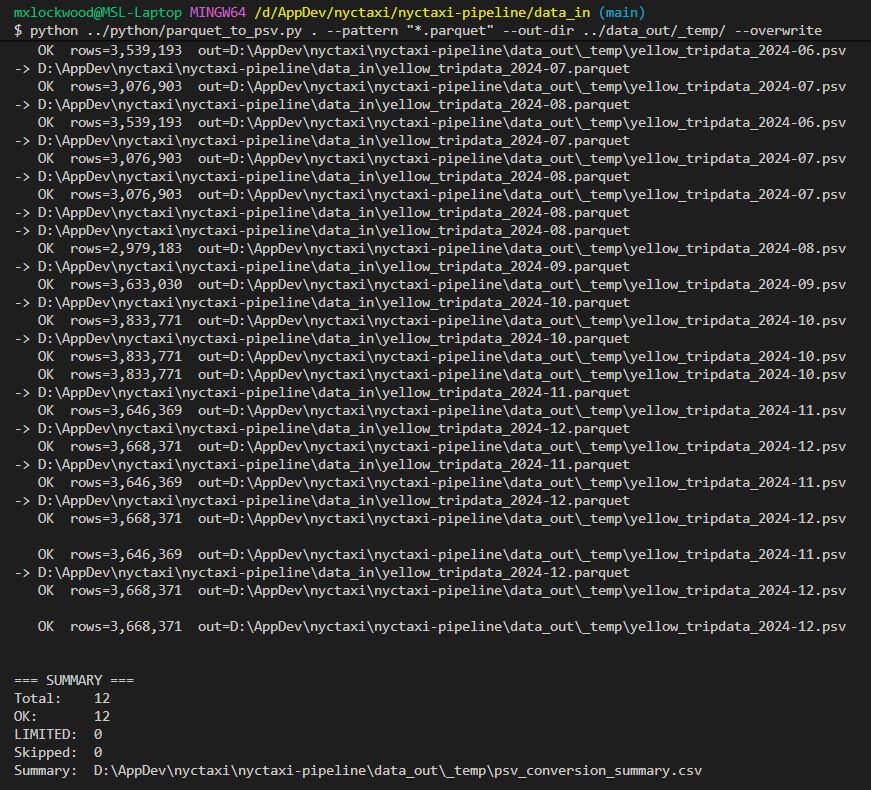
Optionally, you can convert all Parquet files in a directory using –pattern “*.parquet”.
python ../python/parquet_to_psv.py . --pattern "*.parquet" --out-dir ../data_out/temp/ --overwrite
Step 2 — Validate the PSV output file
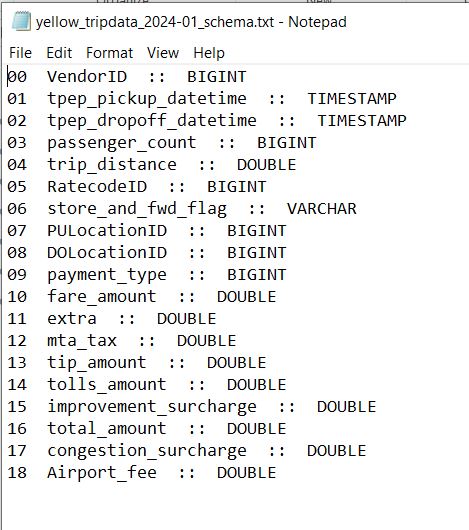
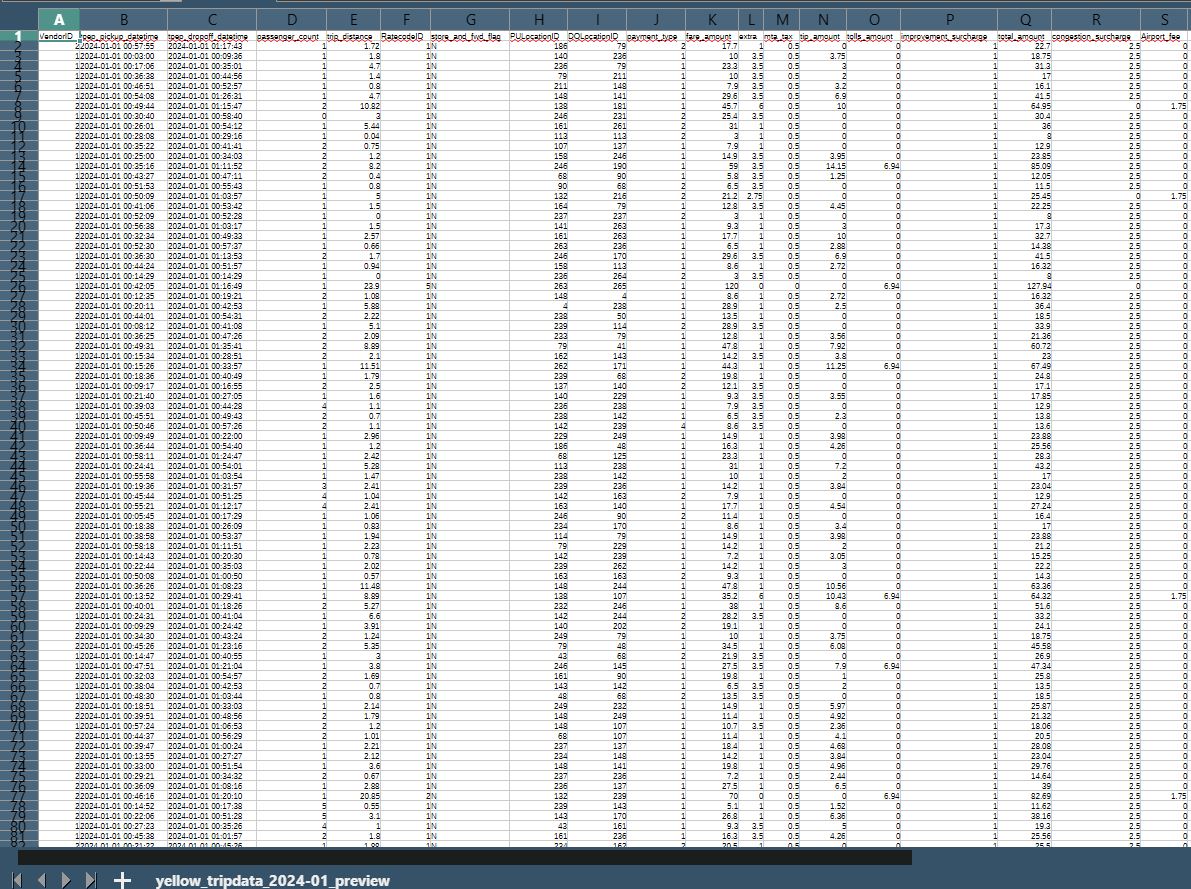
Running both validate_psv.py and validate_parquet.py and seeing each produce a schema file, profile file, and preview file confirms that the data in both formats—PSV and Parquet—was successfully read, parsed, and analyzed end-to-end. It proves that the conversion process from Parquet → PSV preserved the schema structure and field integrity, and that both file types are fully compatible with the validation tools. In other words, this demonstrates that the pipeline can accurately interpret and profile the same dataset regardless of storage format.
python ../python/validate_psv.py ./_temp/yellow_tripdata_2024-01.psv

Schema
Schema
Preview
Preview
Profile
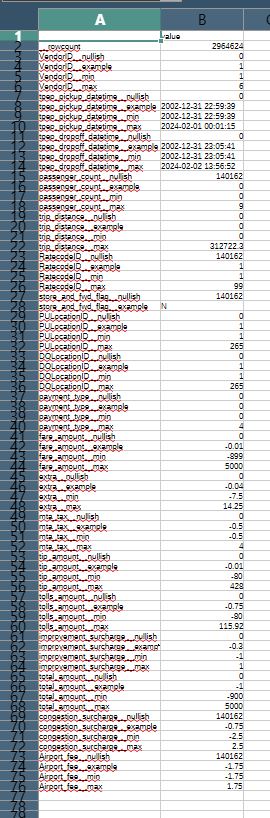
Profile
Step 3 — Validate the Parquet file and compare the output file information
python ../python/validate_parquet.py ../data_in/yellow_tripdata_2024-01.parquet

Schema
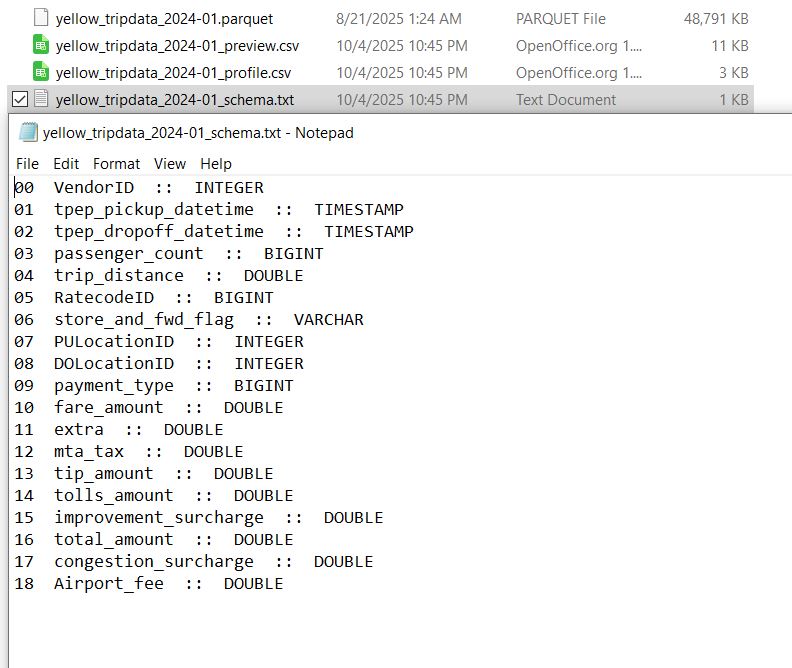
Schema
Preview
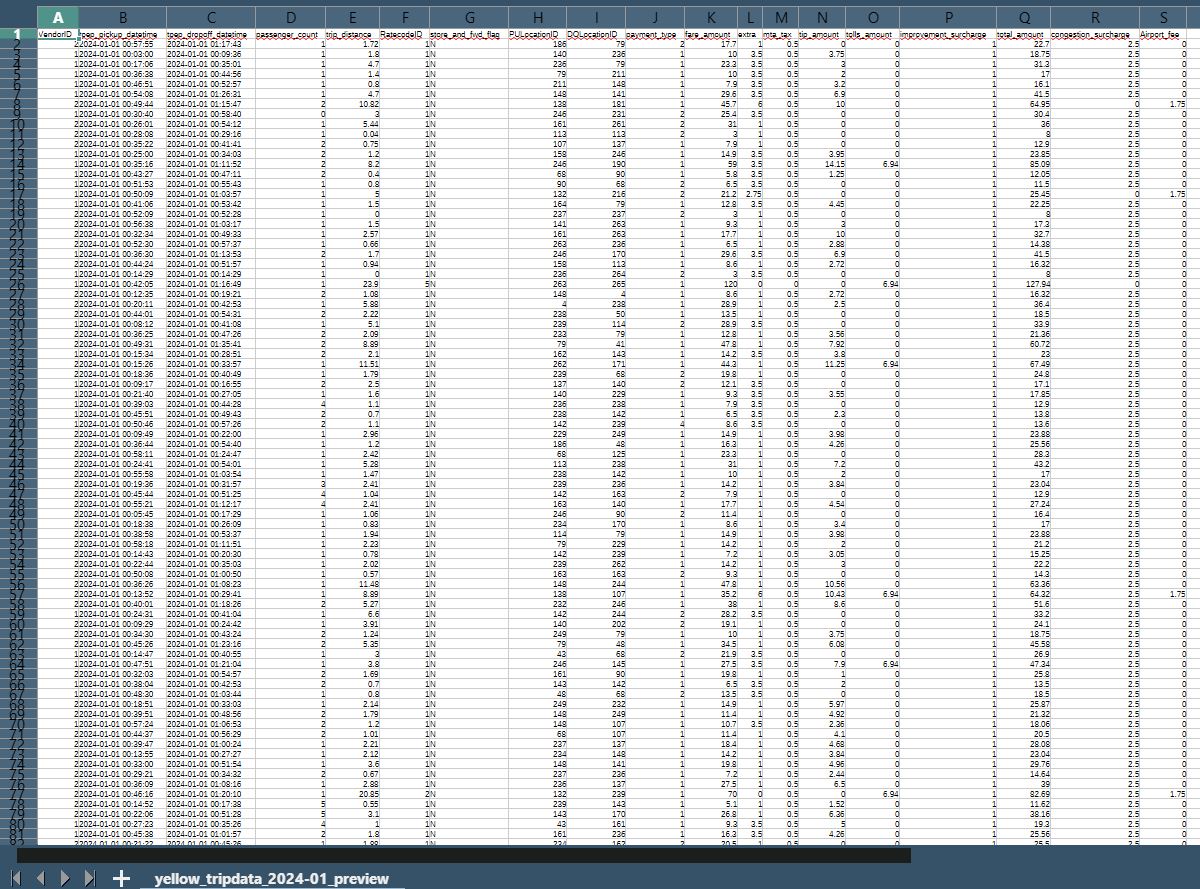
Preview
Profile
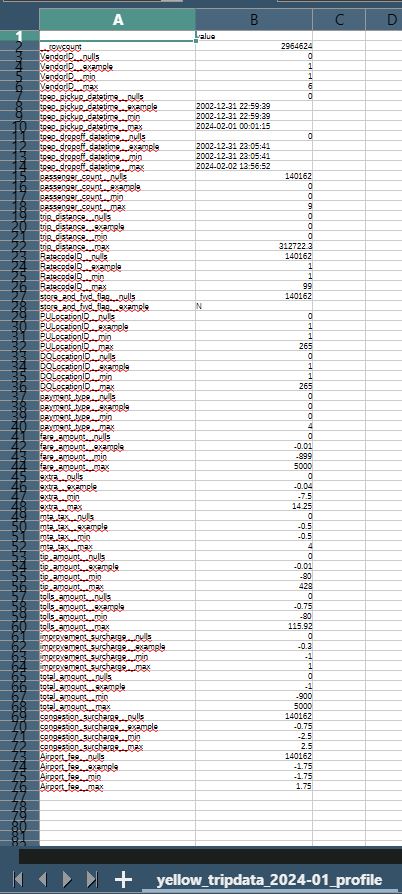
Profile
Step 4 — Merge Parquet files into one large file
python ../python/merge_parquet.py . --pattern "yellow_tripdata_2024-*.parquet" --out ../data_out/_temp/yellow_tripdata_2024.parquet
Merge

Merge
With 12 months of NYC Taxi Parquet files merged into one, this expands my ability to maximize the file size of the data I can upload to Databricks Free Edition for practice and experimentation.
The End ⬆ Back to Top