
Introduction
The Concept of Time Travel
In Delta Lake, Time Travel means you can read a table as it existed at any earlier point, without restoring backups or duplicating datasets. It’s enabled by Delta’s ACID transaction log (the _delta_log folder next to my Parquet files), which records every commit as an immutable, ordered sequence.
Time Travel with Delta-RS: Local Experiments with MinIO, Azurite, and Databricks
- Delta Lake and why “Time Travel” matters.
- Local experimentation is on MinIO (HTTPS) and Azurite (HTTPS) — avoiding reliance on cloud-hosted services—to avoid unnecessary costs associated with cloud compute for most developement and experimentation work.
- Note that this work complements my earlier projects on Parquet ingestion, Delta-RS integration, and Azure emulation.
Versioned Parquet snapshots
Each commit produces a new table version (v0, v1, v2, …). A version is just a logical snapshot composed of the Parquet files that were added or removed in that commit. Delta uses small JSON (and periodic checkpoint) files to describe which data files are active for each version.
ACID guarantees
The transaction log enforces atomicity, consistency, isolation, and durability. Readers see a consistent snapshot (no partial writes), writers don’t corrupt the table if they fail midway, and concurrent operations serialize into clean versions.
Schema enforcement & evolution
The log also captures schema information. Delta can enforce the expected schema and, when configured, evolve it (e.g., add a column) in a controlled, versioned way. Time Travel lets you query before or after such changes.
Reproducibility
Because every version is addressable (by version number or timestamp), you can rerun analyses exactly as they were, audit historical states, compare results across points in time, and debug upstream changes without rolling back data.
Retention-aware
Time Travel relies on the presence of historical log entries and data files. If you VACUUM aggressively or shorten log retention, very old versions may no longer be queryable. In other words: retention policies define how far back you can travel.
Net effect
Delta’s Time Travel turns my Parquet dataset into a transactional, versioned table where historical reads are first-class—fast, reliable, and independent of backup/restore workflows.
Contrast with traditional database recovery or restore scenarios in SQL Server.
👀 Highlight its practical uses: debugging, auditability, reproducible analytics, and schema evolution.
Setting the Stage
- Describe my lab environment:
- MinIO bucket (
nyctaxi-pipeline) over HTTPS for AWS S3 Blob Storage emulation - Azurite bucket (
nyctaxi) over HTTPS for Azure Blob Storage emulation - Databricks SQL (DBX SQL) for validation of versioned reads
- Mention the dataset (NYC Taxi, reduced Parquet samples) and Delta folder structure (
data_in,data_out,delta,snapshots).
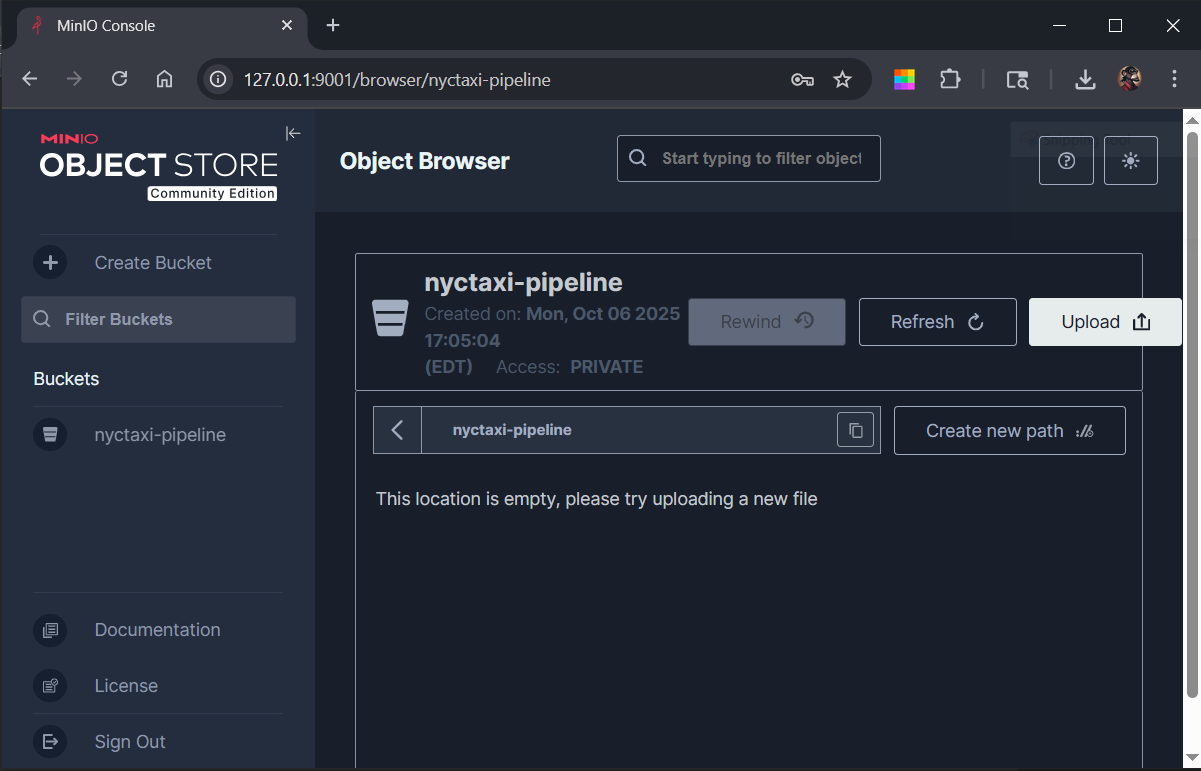 MinIO Object Browser showing the
 nyctaxi-pipeline bucket structure.
Delta-RS and Local Connectivity
- Overview of Delta-RS (Rust implementation of Delta Lake) and why it’s ideal for lightweight, cross-platform experimentation.
- Discuss connection differences:
https://127.0.0.1:10000/...for Azuritehttps://127.0.0.1:9000/...for MinIO
- Mention challenges with Azurite HTTPS (URL rewriting, emulator redirection) and why MinIO proved stable.
🔬 Performing Time Travel
- Step-by-step summary of what the Time Travel operation does:
- Read a Delta table at its latest version.
- Retrieve table history to list all commits.
- Query a prior version using
version=nor a timestamp.
- Example outputs or command patterns (placeholder text for when you import screenshots/code).
- Highlight that Delta-RS enforces version consistency even without Spark or JVM dependencies.
Comparing Environments
- Observations comparing behavior between:
- Delta-RS over Azurite (HTTP)
- Delta-RS over MinIO (HTTPS)
- Databricks SQL dashboard
- Discuss any performance or compatibility nuances.
- Mention how Databricks confirms Delta-RS read consistency.
Lessons Learned
- Reflection on local-first development and emulation of cloud features.
- Key takeaways about:
- TLS configuration complexity (Azurite vs MinIO)
- Importance of clean version management
- Delta-RS maturity and limitations
Closing Thoughts
- How this exploration connects to my larger NYC Taxi Data Engineering Lab and data reliability theme.
- Invitation to readers to try local Delta-RS with emulated object stores.
- Optional LinkedIn-style closing line (encouraging dialogue or sharing experiences).
Appendix (Optional)
- Sample directory structure
- Delta log JSON snippet
- Reference commands for MinIO and Azurite launches
 ⏱ Delta Lake Time Travel in Azurite
🔐 Encrypted over HTTPS — Delta Lake Time Travel step-by-step
🏡 Environment Setup
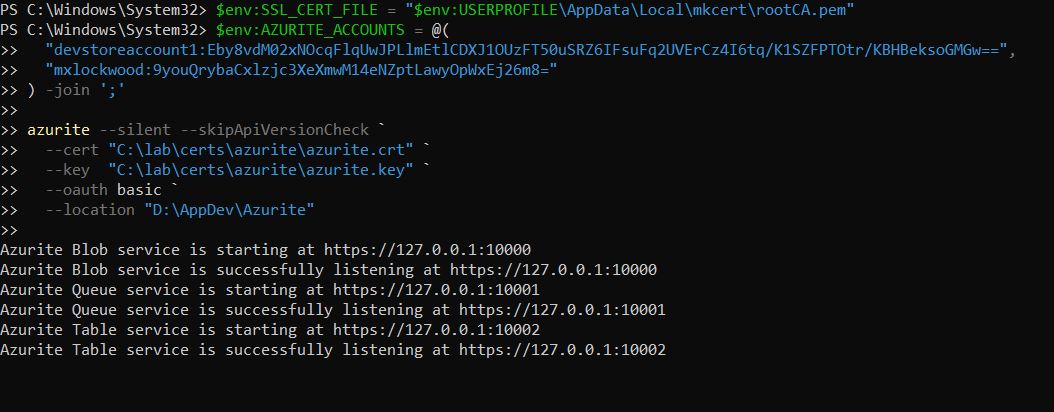
Verified Azurite’s HTTPS trust chain using the mkcert-generated CA:
💡 Azurite doesn’t have a runtime CLI command to “create” accounts the way MinIO or Azure do — instead, accounts are declared when Azurite starts, using the AZURITE_ACCOUNTS environment variable or –oauth basic mode.
🔹 Generate a 64-byte Base64 account key 🗝️
# PowerShell
[Convert]::ToBase64String((1..64 | ForEach-Object {Get-Random -Max 256}))
Output:

🧩 Set a couple of environment variables then start Azurite
🆚 Summary (side-by-side comparison)
| Purpose | MinIO | Azurite |
|---|---|---|
| Root CA | $env:AWS_CA_BUNDLE | $env:AZURE_CLI_CA_PATH |
| Endpoint | $env:AWS_ENDPOINT_URL | $env:AZURE_STORAGE_BLOB_ENDPOINT |
| Region (optional) | $env:AWS_REGION | (not used) |
| Access Key | $env:AWS_ACCESS_KEY_ID | $env:AZURE_STORAGE_ACCOUNT |
| Secret Key | $env:AWS_SECRET_ACCESS_KEY | $env:AZURE_STORAGE_KEY |
| Force Path-Style | $env:AWS_S3_FORCE_PATH_STYLE | (n/a — handled internally by emulator) |
⚡ Using Azure CLI
Although Azurite is a local emulator, its strength lies in behaving like real Azure Storage.
By using the Azure CLI, we can interact with the emulator through the same commands used against production Azure Blob > services.
This parity makes every operation — from container creation to blob enumeration — feel authentic and transferable.
Azure CLI isn’t just convenient; it reinforces confidence that our local workflows will behave identically in the cloud.
Next, create the root container. I’m using NYC Taxi data. Therefore, “nyctaxi”. “tt_demo” comes later.
📦 nyctaxi
└── 🗂️ tt_demo
# PowerShell
az storage container create `
  --name nyctaxi `
  --account-name mxlockwood `
  --account-key 9youQrybaCxlzjc3XeXmwM14eNZptLawyOpWxEj26m8= `
  --blob-endpoint https://127.0.0.1:10000/mxlockwood
⬆ Back to Top ✂️ Note on Brevity
For clarity and focus, this section omits the detailed steps for file preparation, sampling, and upload.
Those processes have been validated previously and are assumed complete here.
🗺️ Discovery
Exploring the local Azurite environment to verify connectivity, enumerate containers, and confirm HTTPS access before writing any Delta tables.
📃 List available containers
Using either az storage container list or BlobServiceClient.list_containers() to ensure the emulator is reachable and our workspace (nyctaxi, tt_demo, etc.) exists and is ready for data operations. Obviously, create your account and key
# Python
...
from azure.storage.blob import BlobServiceClient
import os

account   = "mxlockwood"
key       = "9youQrybaCxlzjc3XeXmwM14eNZptLawyOpWxEj26m8="
endpoint  = "https://127.0.0.1:10000/mxlockwood"
ca_bundle = os.getenv("SSL_CERT_FILE")

conn_str = (
    f"DefaultEndpointsProtocol=https;"
    f"AccountName={account};"
    f"AccountKey={key};"
    f"BlobEndpoint={endpoint};"
)
client = BlobServiceClient.from_connection_string(conn_str, connection_verify=ca_bundle)

print("Available containers:")
for c in client.list_containers():
    print(" -", c["name"])
Output:

🎁 What’s inside?
# Python
...
client = BlobServiceClient.from_connection_string(conn_str, connection_verify=ca_bundle)

# ---- LIST CONTAINERS ----
print("Containers:")
for container in client.list_containers():
    print(" -", container["name"])

# ---- LIST BLOBS IN A KNOWN CONTAINER ----
container_name = "nyctaxi"
container_client = client.get_container_client(container_name)

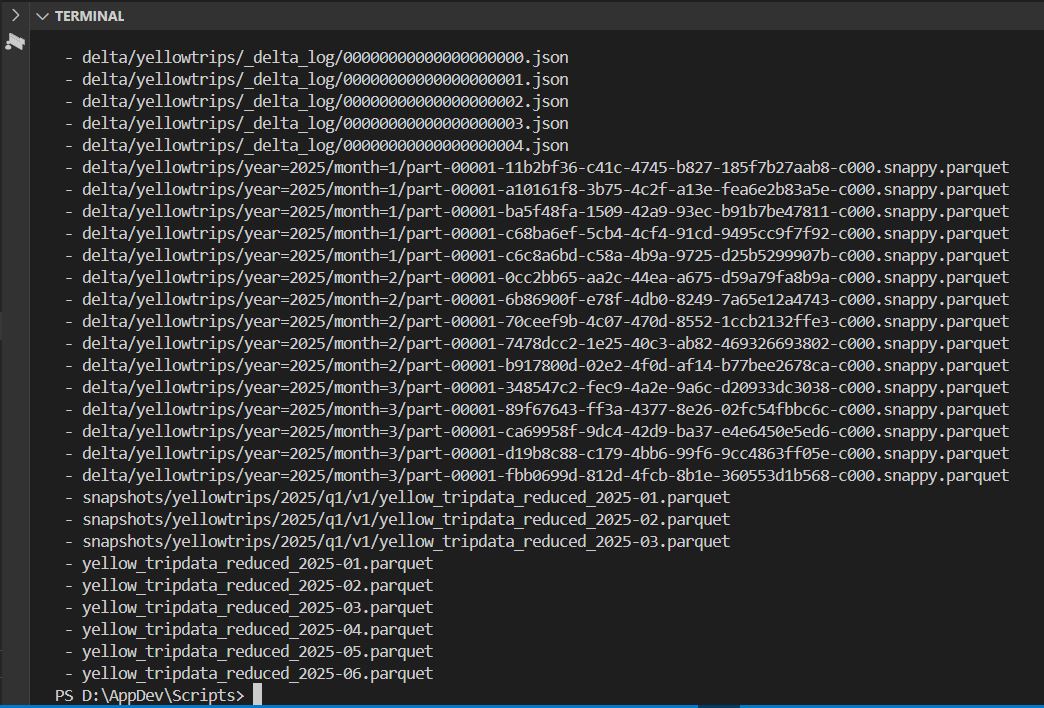
print(f"\nBlobs in '{container_name}':")
for blob in container_client.list_blobs():
    print(" -", blob.name)
Output 1 of 2:
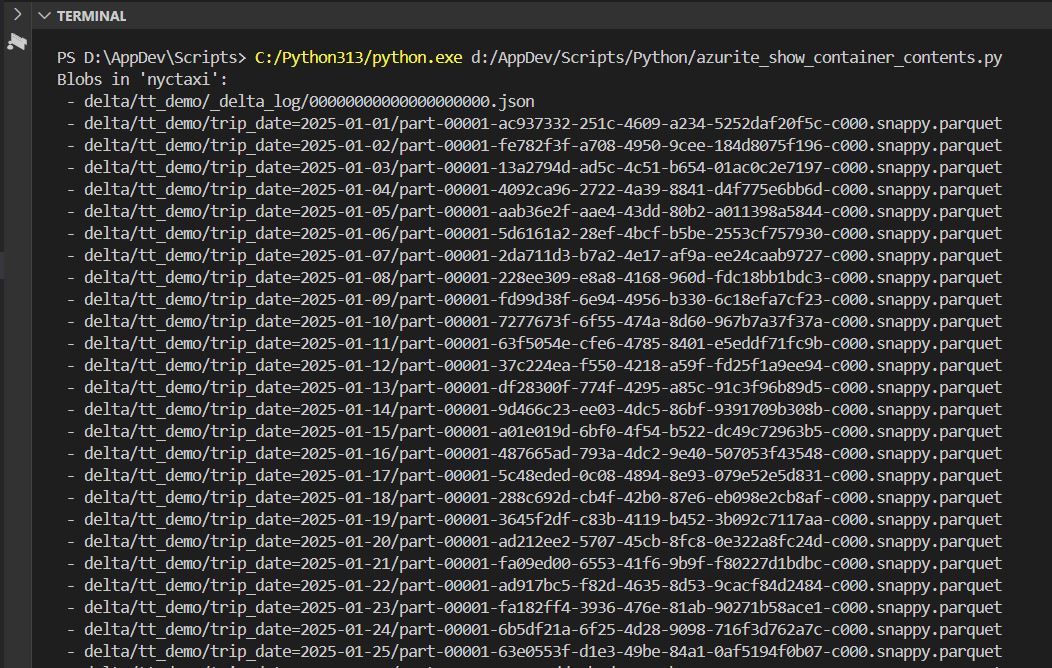
Output 2 of 2:
 ⏱ Delta Lake Time Travel in MinIO
🔐 Encrypted over HTTPS — Delta Lake Time Travel step-by-step
⬆ Back to Top 🏡 Environment Setup
Verified MinIO’s HTTPS trust chain using the mkcert-generated CA:
$env:CAROOT = (mkcert -CAROOT)
$env:AWS_ENDPOINT_URL      = "https://127.0.0.1:9010"
$env:AWS_CA_BUNDLE         = "$env:CAROOT\rootCA.pem"
$env:AWS_S3_FORCE_PATH_STYLE = "1"
$env:AWS_REGION            = "us-east-1"
$env:AWS_ACCESS_KEY_ID     = "minioadmin"
$env:AWS_SECRET_ACCESS_KEY = "minioadmin"
💼 The Business Ask — Presenting Revenue from a Specific Period
“I have a presentation to make showing Taxi Trip revenues from March 12 through May 15.
I need to see metrics A, B, C, D, and E.”
This is the kind of real-world request that comes in from Finance, Operations, or Marketing.
The timeline is narrow, but the expectation is absolute clarity:
| Metric | Description | Power BI Visualization |
|---|---|---|
| A | Total Trip Revenue | KPI Card showing total fare + tips |
| B | Daily Revenue Trend | Line chart of daily totals |
| C | Revenue by Payment Type | Donut chart or stacked bar |
| D | Top 10 Pickup Zones by Revenue | Bar chart |
| E | Vendor Share | 100% Stacked Column comparing vendors |
Rather than running new ETL jobs or risking stale copies, the Delta Time Travel feature let me retrieve a precise historical snapshot of the dataset as it existed during that period.
⬆ Back to Top 🧱 Data Foundation
- Source:
s3://nyctaxi-pipeline/delta/yellowtrips(Delta version 4) - Time window: 2025-03-12 → 2025-05-15
- Output: a single Parquet export written directly to MinIO via HTTPS
- Result: 53,524 rows, cleanly scoped to the requested window
This Parquet file is the one-click data source for Power BI:
From here, I can connect Power BI Desktop to MinIO using an S3-compatible endpoint or stage it temporarily in Databricks for shared analytics.
🧭 What Comes Next
Power BI will surface the visuals the business needs:
A and B from quick DAX measures on fare_amount, tip_amount, and total_amount
C from a simple group-by on payment_type
D using the PUlocationID dimension lookup
E by counting distinct VendorID values
Databricks will join later in the workflow — it’s still a “thin” layer now, but will soon host the same Delta tables for shared compute and reproducible dashboards.
🔑 Key Takeaways A key takeaway: one Delta Time Travel query, one Parquet file, and the entire presentation dataset is reproducible, auditable, and securely sourced from MinIO over HTTPS. Secure HTTPS connection across all platforms Delta-RS Time Travel enabling historical accuracy Zero local dependencies — all cloud-style operations
Key Insight: The same mkcert CA unified MinIO, SQL Server, and Python.
🧠 Pseudocode — Delta Lake Time Travel (Databricks Community Edition)
- Create a small Delta table in my user catalog (DBFS-backed) and note its path.
- Make 2–3 writes (insert, update, delete) to generate multiple versions.
- Inspect history with
DESCRIBE HISTORYto confirm version numbers. - Query past snapshots using
VERSION AS OF <n>andTIMESTAMP AS OF '<ts>'. - (Optional) Demonstrate the
@syntax (table@v123ortable@yyyyMMddHHmmssSSS) as an alternative. - Avoid running
VACUUMfor now — old Parquet files are required for Time Travel to function.
 Time Travel in Databricks (DBX)
⚙️ What Works in Databricks Community Edition (DBX CE)
✅ Delta Time Travel by version and timestamp works natively in CE using both SQL and Spark APIs.
✅ DESCRIBE HISTORY lists operations, timestamps, and version numbers for any Delta table.
✅ @version / @timestamp syntax is supported as a shortcut alternative to VERSION AS OF and TIMESTAMP AS OF.
⚠️ Use DBFS-backed managed tables. External object stores (S3, ADLS, MinIO, Azurite) and Unity Catalog features aren’t available in CE.
💡 Everything happens locally inside the user workspace; still perfect for demonstrating Delta’s ACID log and snapshot isolation behavior.
⬆ Back to Top ⏱️ Time Travel by Timestamp (DBX CE)
How: Copy a timestamp from DESCRIBE HISTORY and query the table as of that moment.
First, I’ll create a small table and populate it with a few rows.
CREATE TABLE tt_demo (id INT, note STRING)
USING DELTA;

-- Insert an initial version
INSERT INTO tt_demo VALUES (1, 'v1 insert'), (2, 'v1 insert'), (3, 'v1 update'), (4, 'v1 delete');

-- Verify data
SELECT * FROM tt_demo;
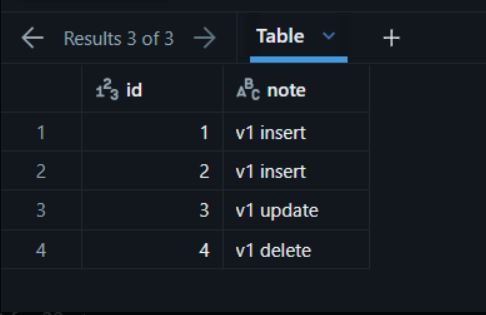
Now, execute DESCRIBE HISTORY tt_demo;
DESCRIBE HISTORY tt_demo;
🧾 Understanding DESCRIBE HISTORY in Delta Lake
The DESCRIBE HISTORY command is Delta Lake’s built-in window into your table’s transaction log.
When executed, it reads the metadata stored in the hidden _delta_log folder and returns a complete audit trail of all commits — one row per table version.
This audit view is both a technical ledger (used by Time Travel) and a compliance record (used for governance and traceability).

🧩 What Each Column Means
| Column | Description |
|---|---|
| version | Sequential number identifying the commit (starting at 0). Each write, update, or delete increments this version. |
| timestamp | UTC timestamp when the operation was committed to the transaction log. |
| userId / userName | The identity of the user who performed the operation (automatically captured in Databricks). |
| operation | The action performed — e.g., CREATE TABLE, WRITE, UPDATE, DELETE, MERGE. |
| operationParameters | JSON-formatted details describing the operation, such as filters, partition columns, or write mode. |
| readVersion | The table version that the writer read before making this commit. |
| isolationLevel | Confirms transactional integrity (commonly WriteSerializable for Delta ACID compliance). |
| operationMetrics | Counts of files or rows affected (inserted, updated, deleted). |
| engineInfo | Identifies the Databricks Runtime or Delta engine version that executed the operation. |
❗ Why It Matters
- Time Travel Reference — It provides the version numbers and timestamps you use in
VERSION AS OFandTIMESTAMP AS OFqueries. - Lineage & Auditing — Acts as a detailed change log showing who did what, when, and how.
- Compliance Evidence — Vital for regulated pipelines (e.g., those handling PII or PHI) where reproducibility and traceability are required.
- Operational Debugging — Quickly spot unexpected writes, failed jobs, or schema changes.
✨ Summary
DESCRIBE HISTORY is the table of contents for Delta’s transaction log — the foundation of Time Travel, data lineage, and auditability in every Delta table.
Next, UPDATE one row to create version 2
UPDATE tt_demo SET note = 'v2 update' WHERE id = 3;
And, DELETE one row to create version 3
DELETE FROM tt_demo WHERE id = 4;
Now, rerun DESCRIBE HISTORY
DESCRIBE HISTORY tt_demo;

💡 In a Notebook, we can view the same history using Python.
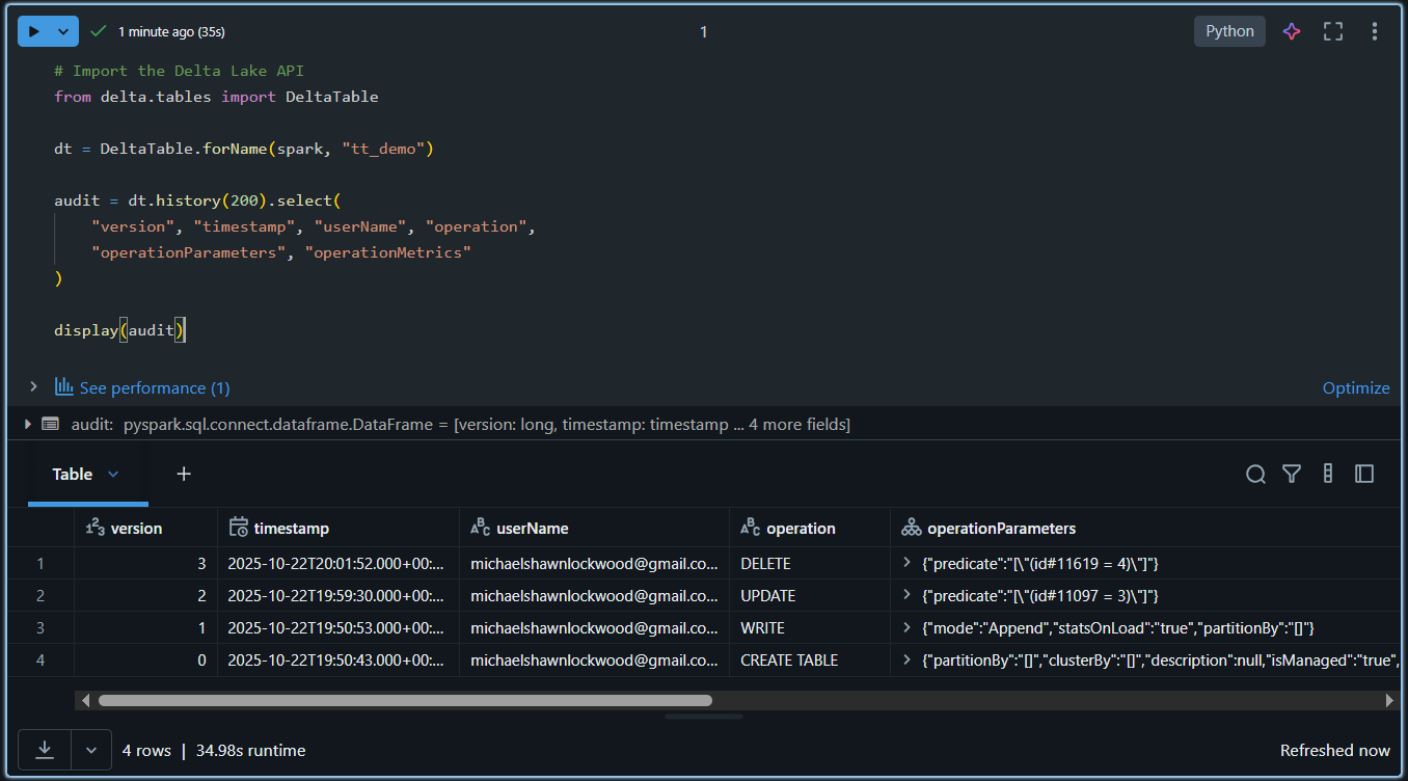
⬆ Back to Top 📜 Results — Time Travel in Action
| Version | Operation | Expected State | Verified |
|---|---|---|---|
| 0 | CREATE TABLE |
Table created, empty | ✅ |
| 1 | WRITE (INSERT) |
Rows (1–4) inserted | ✅ |
| 2 | UPDATE |
Row id=3 → v2 update |
✅ |
| 3 | DELETE |
Row id=4 removed |
✅ |
Snapshot Verification
- Current State (v3) → rows 1–3 (
v2 updatepresent, id 4 gone) - As of Version 1 → original four rows intact
- As of Version 2 → same four rows, but
id 3showsv2 update - @ Syntax → identical results (
SELECT * FROM tt_demo@v1)
✅ Conclusion: Each Delta write produces an immutable versioned snapshot.
VERSION AS OF and TIMESTAMP AS OF allow point-in-time reads without restores or backups — proving Delta’s ACID transaction log guarantees.
💡 I’ve now built the Bronze-layer demo that underpins every higher-layer TT concept.
🏗️ Medallion Architecture — Three Domains Simplified
🥉 Bronze — Raw & Ingested
- Purpose: Capture data exactly as received from source systems — the immutable foundation for all downstream processing.
- Format: Often unstructured or semi-structured (CSV, JSON, logs, EHR extracts, HL7 messages, Parquet dumps).
- Characteristics:
- No transformations, no filtering — fidelity to source is paramount.
- PII and PHI are often present in full form, making this layer highly sensitive.
- Access should be restricted, audited, and short-lived where possible.
- Schema may be inferred or missing; quality checks begin after landing.
- Example: Raw HL7 or FHIR data feeds containing patient identifiers, medication details, or encounter notes stored as Delta for traceability.
⚠️ Compliance Caution:
The Bronze layer is never safe for broad access.
Organizations typically enforce isolation at this stage — dedicated storage accounts, ACLs, encryption at rest (TDE or SSE), and network-level restrictions — ensuring only controlled ETL processes can read or transform data into the Silver layer where de-identification begins.
🔒 What “De-Identification” Means (PII/PHI)
Goal: Reduce the chance a person can be identified from the data while preserving utility for analytics.
Two regulatory paths (HIPAA)
- Safe Harbor: Remove the prescribed set of direct identifiers (the “18 identifiers,” e.g., name, full address, phone, email, SSN, MRN, full-precision dates, etc.).
- Expert Determination: A qualified expert certifies that re-identification risk is very small given context and controls.
Common techniques (choose per use case)
| Technique | What it does | Reversible? | Notes |
|---|---|---|---|
| Masking | Obscure parts (e.g., 555-***-****) |
No | Quick, lightweight; still sensitive if many fields remain. |
| Tokenization | Replace with random tokens (PAT_9F3A…) |
Yes* | Requires secure vault/map; analytics on joins via tokens. |
| Hashing (+salt) | Deterministic pseudonyms from identifiers | Yes* | Use strong hash + per-env salt; vulnerable without salt. |
| Generalization | Reduce precision (e.g., age → 10-year bins) | No | Key for k-anonymity; helps aggregate reporting. |
| Suppression | Drop high-risk fields/rows entirely | No | Use for outliers/small groups. |
| Date shifting | Shift dates consistently per subject | Yes* | Preserve intervals; keep shift secret and consistent. |
| Aggregation | Summarize (counts, rates) | No | Use for Gold KPIs to avoid small-cell disclosure. |
*Reversible by a holder of keys/salts/mappings → **pseudonymization**, not full anonymization.
Where it fits in Medallion
- Bronze → Silver: De-identification begins here. Identify sensitive columns, apply masking/tokenization/generalization, remove free-text PHI, and enforce schema + access controls. Keep an auditable mapping of transformations.
- Silver → Gold: Prefer aggregated, minimal datasets. Apply small-cell suppression (e.g., do not show counts < 10) and expose only what reports need.
Gotchas (easy to miss)
- Free-text notes often contain PHI—redact or drop.
- Dates & locations can re-identify (e.g., rare events); generalize (month/quarter, 3-digit ZIP).
- Linkage attacks: Even de-identified data can be re-identified when joined with external datasets; mitigate with governance, access limits, and aggregation.
Bottom line: In my pipeline, de-identification is a controlled, documented step at the Silver layer that turns raw PHI/PII into safer, analysis-ready data—while preserving lineage back to Bronze if regulated audits require it.
⬆ Back to Top 🥈 Silver — Cleaned & Structured
- Purpose: Provide trusted, queryable data for analytics and integration.
- Format: Fully structured with enforced schema and data types.
- Characteristics:
- Deduped, validated, normalized, and enriched.
- PII and PHI protections are applied here — identifiers masked, tokenized, or removed during transition from Bronze.
- Data quality, referential integrity, and business rules established.
- Serves as the first broadly accessible layer under governance controls.
- Example: Patient encounter data joined with provider and medication reference tables, exposing only de-identified or coded fields such as encounter date, diagnosis group, and billing category.
🔒 Governance Continuity:
Bronze captures everything for lineage; Silver enforces what’s appropriate for consumption.
This is the compliance bridge where raw sensitivity becomes managed data — ensuring every downstream Gold dataset remains HIPAA-aligned and enterprise-safe.
🥇 Gold — Aggregated & Business-Ready
- Purpose: Deliver insight-ready datasets for consumption (BI, ML, APIs).
- Format: Star/Snowflake models, curated views, or feature tables.
- Characteristics:
- Aggregated, summarized, and optimized for performance.
- Tailored to specific use cases (finance, marketing, operations).
- Supports dashboards, KPIs, and machine learning pipelines.
- Example: Monthly revenue summaries, per-vendor performance metrics, or pre-joined datasets driving Power BI visuals.
💡 In short:
Bronze → Silver → Gold represents the journey from raw chaos to refined intelligence, where structure, trust, and usability increase at every stage.
🔒 Compliance Note:
In healthcare and other regulated domains, data classification and privacy enforcement typically begin at the Silver layer.
That’s where organizations enforce de-identification, apply data-access controls, and maintain audit logs before promoting data to Gold, ensuring all consumption layers remain compliant and safe.
Terminology — Layer vs. Zone vs. Domain
| Term | Connotation | Common Usage |
|---|---|---|
| Layer | Logical stage of data refinement (Bronze → Silver → Gold). | ✅ Standard in Databricks and Delta Lake documentation. |
| Zone | Often used in cloud storage contexts (e.g., raw zone, curated zone). | 🟡 Valid but more storage-oriented than logical. |
| Domain | Refers to a business domain (Finance, HR, Patient Care). | ⚙️ Common in data mesh or microservice architectures. |
| Space | Informal; sometimes used internally to describe work areas. | 🔹 Avoid in formal architecture language. |
In short:
Use “layer” when referring to Bronze, Silver, and Gold.
Use “domain” when referring to business subject areas.
⬆ Back to Top 🕓 Time Travel Across the Medallion Layers
Delta’s Time Travel feature is layer-agnostic — it functions anywhere Delta tables exist —
but its intent and value vary by stage of refinement:
🥉 Bronze Layer — Forensics & Recovery
- Use TT to replay or re-ingest raw data exactly as it arrived.
- Valuable for incident response or verifying source integrity.
- Example: Compare raw HL7 messages from version 0 to version 5 after ETL code changes.
🥈 Silver Layer — Audit & Validation
- TT becomes a data-quality checkpoint: confirm that cleansing, joins, and de-identification behaved as expected.
- Enables before/after comparisons across schema-enforced snapshots.
- Example: Inspect patient records prior to masking or deduplication.
🥇 Gold Layer — Reproducibility & Traceability
- TT supports historical reporting and reproducible analytics.
- Analysts can regenerate a dashboard as it appeared on a given date.
- Example: Query
gold.monthly_revenue VERSION AS OF 57to match a published KPI report.
💡 Summary
Time Travel is the connective tissue between Medallion layers —
it preserves lineage, reproducibility, and trust, ensuring that every refinement step from Bronze → Silver → Gold can be explained, audited, and, if necessary, rolled back in time.