
Lab Context
Cluster VIP/Port:10.10.20.25 : 51433
FCI Network Name:SQLCLUSTER
Nodes:SQLNODE2,SQLNODE3
Goal: Patch both nodes to the latest CU with a planned failover and failback, followed by validation.
Runbook Snapshot (High-Level)
- Take a Checkpoint on the future active node (SQLNODE3).
- Planned failover: move the SQL FCI role to SQLNODE3; validate client connectivity via
SQLCLUSTERand port 51433. - Patch the passive node (SQLNODE2) with the CU; reboot if required; confirm node health in WSFC.
- Optionally swing ownership to the newly patched node to test under load; then patch the remaining node (SQLNODE3).
- After both nodes are updated, confirm builds, owners, and resource health; take LKGC snapshots.
Achievements & Milestones ✅
- ✅ Capture pre-failover baseline (cluster/SQL role names, IP resources, DNS, network-name cross-check, port 51433 connectivity, owner listing).
- ✅ Execute a planned failover to SQLNODE3; disks and verify SQL/Agent comes online cleanly.
# Script ID: 20250916200200
# Name: verify-disk-move-and-sentinels.ps1
# Description: Moves the owner group of a WSFC Physical Disk resource
#              (e.g., "Cluster Disk 1") to a specified target node,
#              then verifies disk state and sentinel files.
# Runtime: PS5  |  Type: State-changing (group move + read-only checks)
# Author: Michael S. Lockwood
# Date: 2025-09-16

if ($PSVersionTable.PSVersion.Major -ge 6) {
  Write-Warning "This script requires Windows PowerShell 5.x. Relaunching in PS5..."
  & "$env:SystemRoot\System32\WindowsPowerShell\v1.0\powershell.exe" -File $PSCommandPath
  exit
}

# Identity + time
Write-Host "Node: $(hostname)  User: $env:USERNAME  Time: $(Get-Date -f 'yyyy-MM-dd HH:mm:ss')"
Import-Module FailoverClusters

# --- CONFIG ---
$TargetNode = "SQLNODE3"         # set where you want the disks to live next
$AnchorDisk = "Cluster Disk 1"   # used only to resolve the owning group
$Drives     = 'E','F','G'        # adjust if needed

# Resolve owner group from an anchor disk (e.g., Available Storage or custom role)
$OwnerGroup = (Get-ClusterResource -Name $AnchorDisk).OwnerGroup.Name
Write-Host "`n[Planned move] OwnerGroup: $OwnerGroup  ->  TargetNode: $TargetNode"

# Move the whole group (disks follow the group)
Move-ClusterGroup -Name $ownerGroup -Node $TargetNode -Wait 120

# Post-move verification: group owner
"`n[Post-move: group owner]" | Write-Host
Get-ClusterGroup -Name $OwnerGroup |
  Select-Object Name, OwnerNode, State |
  Format-Table -AutoSize

# Post-move verification: disk resources in this group
"`n[Post-move: disk resources]" | Write-Host
Get-ClusterResource |
  Where-Object { $_.ResourceType -eq 'Physical Disk' -and $_.OwnerGroup -eq $OwnerGroup } |
  Select-Object Name, State, OwnerNode |
  Format-Table -AutoSize

# Verify sentinel files on the new owner
"`n[Verify sentinel files on $TargetNode]" | Write-Host
$paths = $Drives | ForEach-Object { "$_`:\_ok.txt" }
Get-ChildItem -Path $paths -ErrorAction SilentlyContinue |
  Select-Object FullName, Length, LastWriteTime |
  Format-Table -AutoSize
- ✅ View available SQL Server updates: Script ID: 20250922211500, Get-SqlServerUpdates.ps1
- ✅ Install the latest CU on SQLNODE2 (while passive); verify node healthy post-install.
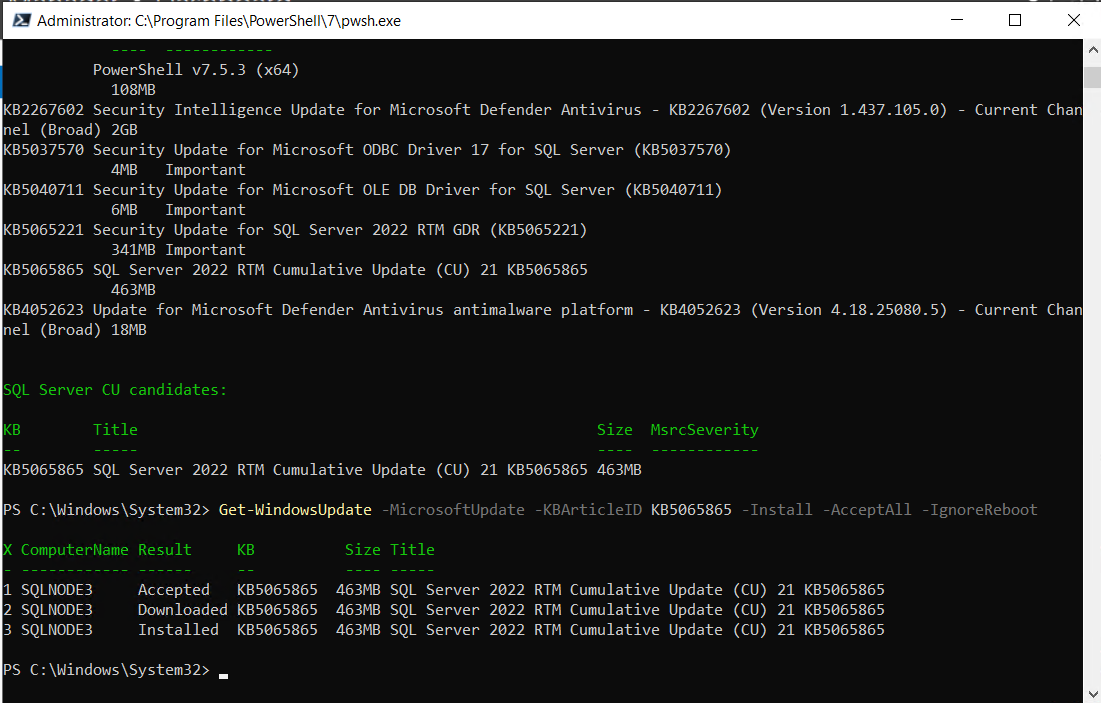
- ✅ Execute a planned failover (failback) to SQLNODE2 and verify state; disks and SQL/Agent come online cleanly.
- ✅ Install the latest CU on SQLNODE3—both nodes are now on the updated build.
- ✅ Take Checkpoints: pre-move on SQLNODE3 and post-patch LKGC on both nodes.
- ✅ Review Server Roles/Features on SQLNODE2: AD DS/DNS not installed, Failover Clustering present; Group Policy Mgmt/Defender noted.
- ✅ These PowerShell 5 scripts: 20250922223000, 20250922223500, and 20250922224000.
Status Checklist
Completed
- Confirm no AD DS/DNS roles on both nodes; features match expected member-server baseline.
- Snapshot/Checkpoint SQLNODE3 before failover.
- Move SQL FCI – Default to SQLNODE3 (planned).
- Verify DNS →
SQLCLUSTER.lab.local→ 10.10.20.25; test connectivity on port 51433. - Install latest CU on SQLNODE2 (passive) + validate.
- Move SQL FCI – Default to SQLNODE2 (planned).
- Verify DNS →
SQLCLUSTER.lab.local→ 10.10.20.25; test connectivity on port 51433. - Install latest CU on SQLNODE3 (passive) + validate.
- Create new Checkpoints on both nodes after CU.
- Add standardized headers to connectivity/firewall/inspect scripts.
Next steps
- Capture build stamps on active node:
SERVERPROPERTY('ProductVersion'),('ProductLevel'),('ProductUpdateLevel'); record in the lab journal. - Confirm Possible Owners/Preferred Owners for all SQL FCI resources include both nodes.
- Add Microsoft Defender exclusions for SQL data/log/backup paths and SQL binaries.
- Do a planned failover to SQLNODE3 and back to validate both directions under light load.
- Run a NYC Taxi workload smoke test; initiate a controlled failover during a long query to observe behavior.
- Decide on MPIO (only if you configure multipath iSCSI); otherwise leave off.
- Document CU KB/build number and attach screenshots (pre-failover baseline, ownership on SQLNODE3, Server Roles/Features view).
- Post-patch hygiene: remove CU installers from temp locations; monitor SQL & WSFC logs for 24–48 hours.
Nuances & Notes
- Keep nodes online (not paused) during rolling CU on FCIs; let setup manage ownership lists and service stops as needed.
- Do not install AD DS/DNS roles on SQL FCI nodes; member-server posture keeps the cluster clean and reduces risk.
- Antivirus: add SQL-specific exclusions to avoid perf hits and spurious failover signals.
SANE Block
Summary of Achievements. Next Steps. Evaluation.
Next Steps — tracked.
Evaluation — The run was clean: Planned failover and failback, no role/resource flapping, and healthy post-patch validation on both nodes. The environment is ready for build-stamp capture, antivirus and Defender exclusions, and workload-under-failover testing.
Screenshots to embed after upload:
1) Pre-failover baseline output (inspect script).
2) FCI ownership on SQLNODE3 post-move.
3) Server Manager → Roles/Features on SQLNODE2 (showing no AD DS/DNS).